Borderlands 4 Snowy Wells Safehouse Walkthrough, Datapad Location and How to Claim Command Console

In Borderlands 4 Guides, tackling the Borderlands 4 Snowy Wells Safehouse requires precise navigation through its challenging terrain. Start by approaching from the east side of the structure. If you're arriving via the road below, use your grapple hook to ascend the initial ledge for access.
Snowy Wells Safehouse Location:
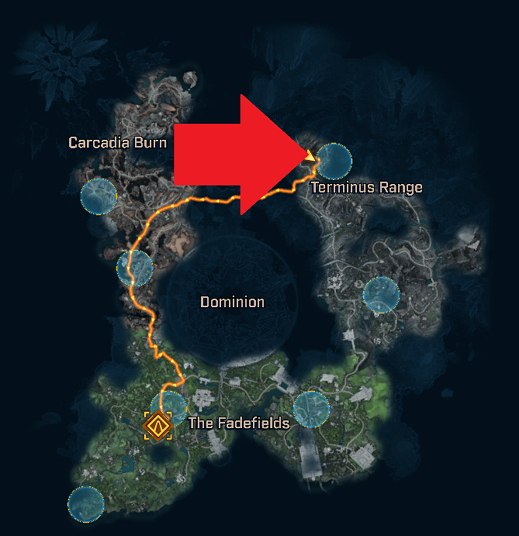
From the east, proceed up the ramp and move clockwise around the building. Jump onto the next ledge, then look directly upward to spot the grapple point. Continue climbing by grappling repeatedly until you reach the top of the building, and from there, grapple even higher onto additional points.
Next, grapple further up into the mountain ledges overlooking the area. Head to the left from this vantage, then veer east toward a drop-down ledge. Descend carefully and glide across to the isolated, broken-down tower floating apart from the main structure. The Borderlands 4 Snowy Wells datapad location is right there on the tower, ready for collection.
Snowy Wells Datapad Location:
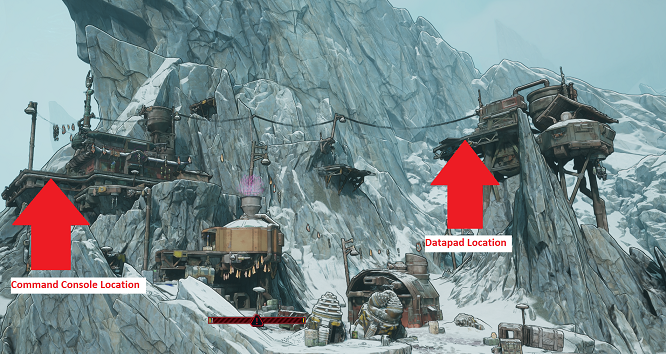
Retrace your steps back across the glide path, grappling up as needed, and wait for your booster to recharge before gliding return to the primary safehouse building. For the Borderlands 4 snowy wells walkthrough continuation, shift to the southwest side atop the safehouse. Drop down one ledge from the roof level to access the command console.
Use the datapad to claim the command console, thereby unlocking the full potential of the Snowy Wells safehouse in your Borderlands 4 adventure.